


NotPTBP Cocrea: https://cocrea.world/@NotPTBP
What is System Tools ?
System Tools is an extension created to get informations about the user’s browser and operating system.
Why do you need System Tools?
When developers design games, they occasionally need to offer appropriate content display and prompt information based on the player's gaming environment. For instance, players utilizing the MacOs operating system might observe distinct prompts compared to players using the Windows operating system.
In addition, System Tools also provides browser pop-up window function, which can be used to create some prompt content.
How to use System Tools?
Modules
Modules | Description |
🌅 Basic Blocks | To acquire client information |
🔢 Common Boolean and return values | Get some common client statuses |
🔉 Notifications and pop-ups | Provide browser pop-up window function |
📖 More building blocks | Convenience block added by the author in the extension |
Functions and definitions
🌅 Basic Blocks

This reporter block with the JSON setting will create a text with all the browser and operating system informations in the json format.

- With the browserName setting, you will only get the name of the browser.
- the browserVersion setting, give you the version of your browser.
- osName setting show you the name of the user’s operating system.
- osVersion give you the Main version of the os (Windows 10/11 for example).
- deviceName give the name of the current device.(Like PC or Mobile).
- CPU bits show the bits of the CPU.

This block will fill a list with the client information. You need to make a list before using this block.
🔢 Common Boolean and return values

This block shows if the user is online or not. If the current user is connected to the internet, return true; if not, return false.

This block show if the user is in the editor. If the current user is in the editor, return true; if not, return false.

This one return the operating environment. If running in the editor, return "dev"; if running on the project page, return "prod".
🔉 Notifications and pop-ups

This block will create pop-up to ask for notification permissions like this:
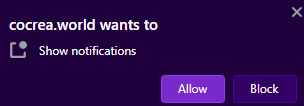

This will check if the permissions are granted or not.

A block to notify with a title, a content, and an icon.
Perfect for an achievement system right?

A block that will give an alert with a custom message like this:
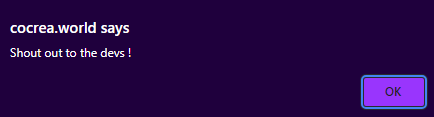
📖 More building blocks
Only one block this time and it’s this one:

It will repeat by the length of your list and will automatically increment one of the variable every time this block is repeating.
Credits
Extension created by : YUEN
Original doc : https://learn.ccw.site/post/5e4fff4e-3556-4497-a453-a2480864d90d
Document by NotPTBP : https://cocrea.world/@NotPTBP
Need help ? Go here:https://discord.gg/gandi